Supplier Quality

Supplier quality. Closed-loop.

Bring suppliers directly into structured quality workflows: from issue notification and containment to root cause, corrective action and closure.

Quality notifications8D reportsCorrective actionsCertificates
app.esshub.ai · Complaints & 8D
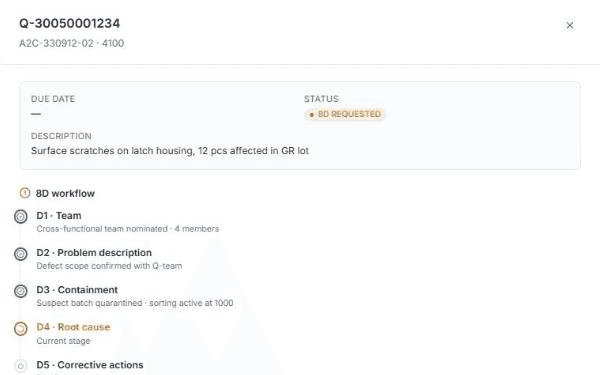
ESS Hub Complaints & 8D: quality notification with part, plant, due date, status and the D1–D8 workflow

Structured, not scattered.Quality notifications and 8D reports live in the same workspace as the orders, shipments and documents they concern.

Q-Notes8DD1 TeamD2 Problem descriptionD3 ContainmentD4 Root causeD5 Corrective actionsD6 ImplementationD7 PreventionD8 Closure

Quality issue lifecycle

From issue to closure, one structured path.

A supplier quality issue moves through defined stages with the supplier involved at each of them. The point is structured collaboration and a history both sides can rely on.

01IssueDefect found
02Supplier notificationQ-Note opened
03ContainmentImmediate actions
04Root causeAnalysis
05Corrective actionAgreed measures
06ImplementationMeasures in place
07VerificationEffectiveness checked
08ClosureReport closed

Supplier complaints

A quality issue becomes a record, not an email thread.

The quality notification carries what both sides need: the part and plant concerned, the supplier, a due date, the description of the defect and the current status. The supplier sees the same record the quality team works on.

  • Issue description

    What was found, in how many pieces, in which lot.

  • Affected part and plant

    Part number and plant on the notification.

  • Supplier

    The notification is addressed to one supplier record.

  • Due date

    When the response is expected.

  • Status

    For example: 8D requested.

  • Request clarification

    A structured question back to the quality team, from the record itself.
app.esshub.ai · Complaints & 8D
ESS Hub quality notification: Q-Note number, part, plant, due date, status 8D requested, defect description and the first 8D steps
Quality notification (Q-Note) with 8D workflowEnterprise view · real product UI

8D reports

A structured 8D process shared with the supplier.

The eight disciplines as they appear in ESS Hub. The supplier works on the same report as the quality team; every step shows its state and what was done.

  1. D1TeamCross-functional team nominated
  2. D2Problem descriptionDefect scope confirmed with the quality team
  3. D3ContainmentSuspect batch quarantined · sorting active
  4. D4Root causeCurrent stage
  5. D5Corrective actionsNot started
  6. D6ImplementationNot started
  7. D7PreventionNot started
  8. D8ClosureNot started
Step names as they appear in the ESS Hub 8D workflow · example state of one reportDoneCurrent stageOpen

Collaboration

The collaboration layer around the 8D.

One report, two organisations. The supplier and the quality team look at the same record and the same step status; questions go through the record, not through mailboxes.

Shared record

Supplier and enterprise work on the same quality notification and the same 8D report.

Both sides

Step-by-step status

Each discipline shows whether it is done, current or open, with a note on what was done.

D1–D8

Due dates

The expected response date sits on the notification, visible to the supplier.

Deadline

Request clarification

The supplier asks structured questions from the record; the quality team answers in context.

Communication

8D template

The 8D template can be downloaded from the record so the supplier reports in the expected structure.

Template

Open 8D at a glance

Open 8D reports and items awaiting the enterprise are counted on the dashboards of both sides.

Overview
Learn about the 8D process

Traceability

From issue to closure, keep the history.

A structured record answers the questions an email thread cannot: which part and plant, which supplier, what the status is, what was done at each step and whether the issue was closed.

The quality recordReal product structure
  • Q-Note Q-30050001234Part A2C-330912-02 · plant 4100 · supplier · due date8D requested
    • DescriptionSurface scratches on latch housing, 12 pcs affected in GR lot
    • 8D workfloweight disciplines with state and noteD1–D8
      • D1–D3Team · problem description · containmentdone
      • D4Root causecurrent
      • D5–D8Corrective actions · implementation · prevention · closureopen
    • CommunicationRequest clarification · 8D template
  • Which part, plant and supplier

    The notification is tied to a part number, a plant and one supplier record.

  • What the status is

    Notification status and, inside the report, the state of every discipline.

  • What was done at each step

    A note per discipline records the action taken: team nominated, batch quarantined, sorting active.

  • Whether it was closed

    D8 · Closure marks the end of the loop.

  • Audit trail

    Enterprise administrators have an audit trail of actions in the portal.

The quality workspace

Complaints, certificates and audits in one place.

The supplier's quality area in ESS Hub is not limited to the 8D. It keeps the documents the quality relationship depends on next to the issues.

Complaints & 8D

Quality notifications with due date and status, and the 8D report worked through D1 to D8.

Q-Notes · 8D

Certificates

Current certifications with certification body, certificate number and validity; renewals uploaded as PDF; expiring certificates flagged on the dashboard.

Validity · renewals

Audits

Supplier audits have their own module in the supplier and enterprise workspace.

Module

Real product UI

Quality screens, shown as they are.

Screens from ESS Hub. Demo data, real application.

app.esshub.ai · Complaints & 8D
ESS Hub 8D report panel: Q-Note header, due date, status, description, D1–D8 workflow with states, request clarification and 8D template
8D report: D1–D8 with states and notesEnterprise view · real product UI
app.esshub.ai · PPAP
ESS Hub PPAP screen: open submissions, awaiting customer review, approved and rejected counters; part submission warrants with part, supplier, submission level, reason, due date, completed elements out of 18 and status.
PPAP: part submission warrants, level, elements and statusSupplier view · demo data
app.esshub.ai · Supplier Cockpit
ESS Hub supplier cockpit: getting-started checklist, open demands, ASNs in transit, open 8D, expiring certificates, blocked invoices, documents awaiting confirmation, deliveries due this week and latest messages.
Open 8D and expiring certificates at a glanceSupplier view

Request a demo

See a supplier quality issue run as one structured 8D.

A live walkthrough of ESS Hub quality notifications and 8D reports with your own parts, plants and suppliers.