Procurement & Sourcing

Procurement that starts with demand — not paperwork.

From RFQ and supplier quotations to purchase orders, forecasts and scheduling agreements, ESS Hub gives buyers and suppliers one shared process connected to the ERP behind it.

RFQ & quotationsPurchase orders & call-offsForecastsScheduling agreements
app.esshub.ai · Demands
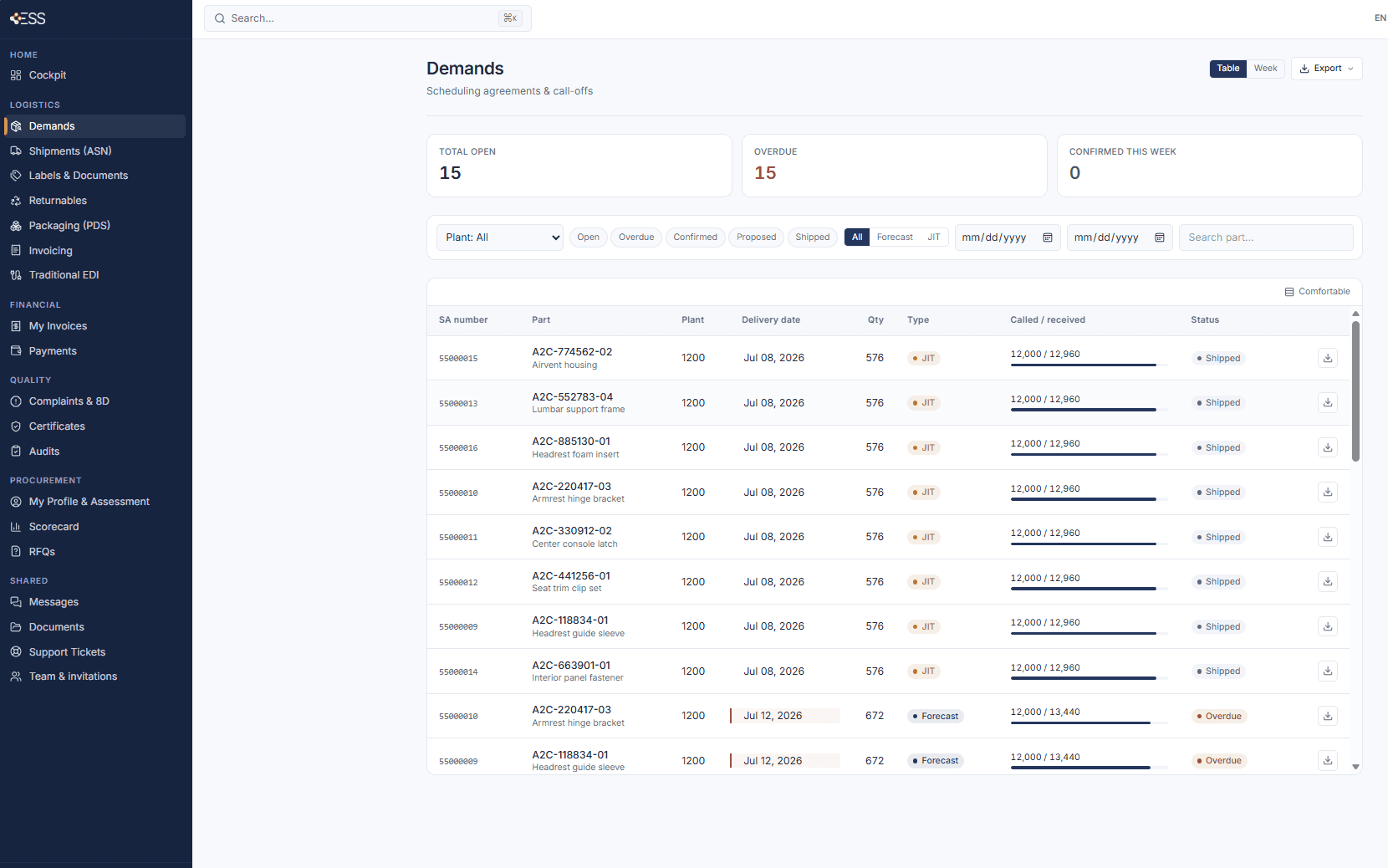
ESS Hub Demands: scheduling agreements, call-offs and forecasts per part and plant, with called and received quantities

Not a replacement for ERP purchasing.The ERP stays the system of record. ESS Hub is the supplier collaboration layer around the procurement process.

SAP ECCSAP S/4HANARFQQuotationsPurchase ordersCall-offsForecastsScheduling agreementsSupplier onboardingScorecard

Procurement lifecycle

Collaboration continues beyond sourcing.

From the first request for quotation to the delivery against the order, buyers and suppliers stay in one process. The ERP remains the system of record at every step.

01SourceRFQ · Supplier invitations · Quotations
02PlanForecasts · Scheduling agreements
03OrderPurchase orders · Order changes · Supplier confirmation
04ExecuteDelivery · ASN
05ERPSystem of record

RFQ / Sourcing

Bring suppliers into sourcing without bringing sourcing back to email.

One request, one place for requirements, quotations and clarifications. Buyers and suppliers work the same steps in the same order.

  1. 01Buyer
    Buyer creates RFQThe request starts in ESS Hub, not in a mailbox.
  2. 02Buyer
    Select suppliersThe buyer chooses which suppliers are asked to quote.
  3. 03Supplier
    Suppliers receive requestThe RFQ appears in each invited supplier's workspace.
  4. 04Supplier
    Review requirementsThe supplier reviews the request before quoting.
  5. 05Supplier
    Submit quotationThe quotation is submitted in the same place the request came from.
  6. 06Both
    Clarifications / revisionsQuestions and updated quotations stay linked to the RFQ.
  7. 07Buyer
    Review quotationsThe buyer reviews the quotations received.
  8. 08Buyer
    DecisionThe RFQ is closed and ordering follows in the ERP process.
Conceptual workflow · the sequence ESS Hub is built aroundBuyerSupplierBoth

Purchase order collaboration

Purchase orders become a collaboration process.

The ERP sends the purchase order. ESS Hub presents it to the supplier, who reviews and responds. Confirmation and status flow back into the same business process.

SAP / ERPPurchase order created
Purchase orderLines, quantities, dates
ESS HubPresented to the supplier
SupplierReviews and responds
ConfirmationAcknowledgement · quantities · dates
ESS HubStatus tracked
SAP / ERPConfirmation received

What stays connected

What the supplier sees is what the buyer sent.

Orders, call-offs and confirmations are one object on both sides: no re-typing, no parallel spreadsheet, no status lost in a mailbox.

Order and call-off visibility

Every order line the ERP sends is visible to the supplier with part, plant, quantity and delivery date.

Supplier · Buyer

Supplier confirmation

The supplier confirms in the platform; the buyer sees who has confirmed and who has not.

Confirmation

Quantities and dates

Called and received quantities per line, with the delivery date the process is running against.

Per line

Status tracking

Open, confirmed, shipped or overdue: the same status on both sides, without asking by phone.

Both sides

Supplier communication

Messages and supplier letters with read-and-confirm tracking, next to the documents they refer to.

Messages

Documents

Specifications, instructions and agreements published to the supplier with confirmation of reading.

Documents

Forecasts & scheduling agreements

Give suppliers visibility before the order arrives.

Forecasts and scheduling agreements reach the supplier as structured demand: part, plant, quantity, date and type. The supplier plans capacity and material against the same numbers the buyer sees.

  • Demand visibility

    Forecast and JIT call-offs per part and plant, in one list.

  • Scheduling agreements

    The long-term agreement each call-off belongs to.

  • Call-offs / releases

    Firm demand with quantity and delivery date.

  • Called vs. received

    Progress per agreement, visible to both sides.

  • Status

    Open, confirmed, shipped or overdue.

  • Export

    Excel, CSV, PDF or EDI flat file for the supplier's own systems.

app.esshub.ai · Demands
ESS Hub Demands table: scheduling agreement number, part, plant, delivery date, quantity, type (JIT or forecast), called and received quantities and status
Demands: forecasts, scheduling agreements and call-offsSupplier view · real product UI

Demand timeline

From forecast to firm call-off.

Long-term arrangements and short-term demand in one sequence, so the supplier can plan before the order becomes firm.

ForecastPlanning horizon
Scheduling agreementLong-term frame
Call-off / releaseFirm quantity and date
ShipmentASN against the call-off
ERPGoods receipt and settlement

Supplier experience

Different supplier maturity. One procurement process.

Suppliers do not need an integration project to take part. They work in the web portal or, where appropriate, through EDI, API or file exchange. The buyer runs one process either way.

Web portalBrowser-basedQuote, confirm and review demand in the browser. No local infrastructure required.
EDIClassic EDIOrders, schedules and confirmations exchanged automatically with established standards.
APISystem-to-systemFor suppliers that integrate their own ERP or platform directly.
SFTP / FilesStructured filesScheduled, structured file exchange where that is the supplier's reality.
ESS HubRFQ · Orders · Forecasts · Scheduling agreements
One procurement processThe same request, order and confirmation, whatever the channel

ERP connection

Connected to the purchasing system behind the process.

RFQs, orders, forecasts and confirmations exchanged in ESS Hub correspond to purchasing documents in your ERP. The hub structures the supplier side and exchanges it through the integration layer your landscape already uses.

Procurement collaboration outside the ERP. Enterprise process connected to the ERP.

ESS Hub is developed by EDI & SAP Solutions SRL for SAP ECC and SAP S/4HANA landscapes and connects to other ERP systems through EDI, IDoc, API, SFTP, files and integration middleware.

Explore SAP Integration
Primary
SAP ECCSAP S/4HANA
Also
Other ERP systems
Integration methods
EDIIDocAPISFTPFilesIntegration middleware

Real product UI

Procurement screens, shown as they are.

Screens from the ESS Hub supplier workspace. Demo data, real application.

app.esshub.ai · Scorecard
ESS Hub Scorecard: monthly supplier performance rating with on-time delivery, PPM, ASN accuracy and 8D response time KPIs, a six-month trend and a per-plant breakdown.
Supplier scorecard: OTD, PPM, ASN accuracy, 8D response timeSupplier view · real product UI · demo data
app.esshub.ai · Supplier Cockpit
ESS Hub supplier cockpit: getting-started checklist, open demands, ASNs in transit, open 8D, expiring certificates, blocked invoices, documents awaiting confirmation, deliveries due this week and latest messages.
Open demands at a glanceSupplier view
app.esshub.ai · Demands
ESS Hub Demands export menu: Excel, CSV, PDF and EDI flat file
Export: Excel, CSV, PDF, EDI flat fileSupplier view

Request a demo

See procurement collaboration with your own RFQs and orders.

A live walkthrough of ESS Hub with your purchasing documents: RFQs, orders, call-offs and forecasts, connected to your ERP landscape.