Invoice identification
Invoice number and the purchase order and delivery note the invoice refers to.
Invoice no. · PO · delivery noteSupplier Finance · Visibility
ESS Hub gives suppliers visibility into the status of their invoices and payments within the same environment used for supplier collaboration. Instead of relying on email exchanges to ask whether an invoice was received, processed or paid, suppliers can access the available status information directly in ESS Hub.
Invoice and payment information can be connected with the customer's ERP and finance processes, allowing supplier-facing status visibility to reflect the information made available by the connected backend system. Not every ERP exposes the same information, and which statuses are populated depends on the implemented integration.
Information flow
The invoice goes to the customer; the status comes back. The customer's ERP and finance process — SAP in many implementations, but not only SAP — processes, posts and pays the invoice, and the status information it makes available is shown to the supplier in ESS Hub.
Supplier view
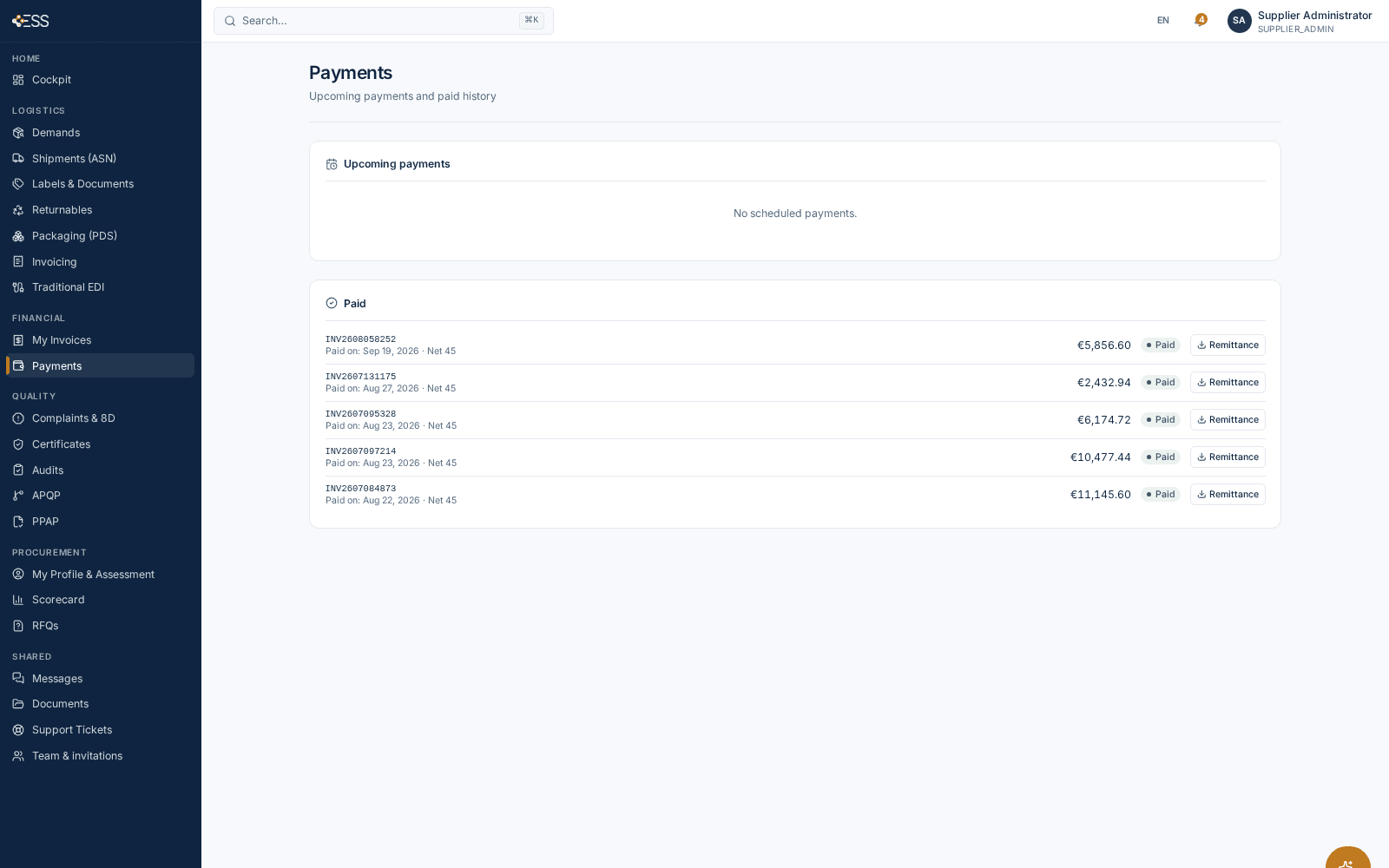
The information below is what the supplier's invoice list, invoice details and Payments page show in ESS Hub today. Which statuses are actually populated depends on what the connected finance process provides.
Invoice number and the purchase order and delivery note the invoice refers to.
Invoice no. · PO · delivery noteInvoice amount, net amount and VAT.
Amount · net · VATWhen the invoice was received on the customer side.
ReceivedReceived · In matching · Matched · Posted · Parked · Paid · Rejected, with a progress view Received → Matched → Posted → Paid.
StatusThe agreed payment terms and the expected payment date derived from them.
Terms · expected paymentThe paid date and, for paid invoices, the remittance advice (REMADV) for download.
Paid on · remittance adviceOpen invoices, blocked invoices, invoices paid in the last 30 days and the next payment date.
OverviewA support ticket can be opened directly from an invoice.
TicketProcessing
Invoice status and payment status are not the same thing. Invoice status describes what is happening with the invoice during processing on the customer side. Payment status describes what information is available about settlement.
In ESS Hub the invoice list shows the invoice status with the values Received, In matching, Matched, Posted, Parked, Paid and Rejected, and a progress view of the stages Received → Matched → Posted → Paid. Parked and Rejected show that an invoice is on hold or was rejected; the reason behind such a status is handled in the customer's accounts-payable process and is not displayed as a separate field in ESS Hub today.
Settlement
ESS Hub includes payment-status visibility so suppliers can access the payment information made available through the connected customer finance or ERP process.
What the supplier sees in ESS Hub today:
ESS Hub does not initiate bank payments and does not predict payment dates beyond the agreed payment terms. Which payment information is shown live — for example a confirmed payment date or a payment reference — depends on what the connected finance process transmits to ESS Hub.
Architecture
ESS Hub acts as the supplier-facing collaboration layer; the customer's ERP remains the system of record for invoice processing and payment. Status information travels the other way: from the finance process, through the integration layer, into the supplier's view in ESS Hub. The exact integration — which messages or interfaces carry invoice and payment information — depends on the customer's ERP landscape and implementation; SAP is the most common scenario. SAP Integration · EDI & B2B Integration · ESS Hub technical architecture
Operations
Suppliers ask accounts payable the same questions every day:
In ESS Hub the answers are on the invoice: the received date, the processing status, a Parked or Rejected status when something is on hold, and the paid date and remittance advice once paid. ESS Hub provides a supplier-facing place where the available invoice and payment information can be accessed without relying exclusively on e-mail communication with accounts payable; a supplier that still needs help opens a support ticket from the invoice itself.
Business process
Finance is part of the broader supplier relationship in ESS Hub: the invoice refers to the purchase order and the delivery note, and its status follows the customer's processing. This is the wider business-process relationship, not a description of matching logic — invoice matching and posting take place in the customer's accounts-payable process. Document intelligence and AP automation are a separate ESS product (Drelo.ai) and are not part of ESS Hub or of this page. Invoicing in ESS Hub · Procurement · Logistics · Invoice processing
Product evidence

Architecture
ESS Hub is designed to provide supplier-facing collaboration and visibility without requiring the customer's ERP to be replaced. Relevant invoice and payment information can remain managed by the existing finance system while ESS Hub provides the supplier-facing experience.
SAP is an example of an ERP landscape ESS Hub integrates with: invoice processing and payment run in SAP finance and accounts payable, and ESS Hub shows the supplier what that process makes available. Other ERP systems are connected through the same architectural role — supplier-facing layer in front, system of record behind — with the integration defined per landscape.
Record
A status enquiry by e-mail leaves its answer in a mailbox. In ESS Hub the invoice carries its status and dates — received, matched, posted, paid — and the payment information sits with the invoice, so supplier and customer refer to the same record.
Platform-wide, enterprise administrators have an audit trail of actions in the portal, and business records carry their status and dates instead of being reconstructed from mailboxes. Infrastructure-level logging and compliance topics are covered in the vendor assessment. No accounting or regulatory statement is made here: invoice processing and payment remain in the customer's finance system.
FAQ
Yes. The supplier's invoice list in ESS Hub shows the status of each invoice — Received, In matching, Matched, Posted, Parked, Paid or Rejected — with a progress view of the stages Received → Matched → Posted → Paid, as provided by the connected finance process.
Yes. Suppliers see the expected payment date per invoice, a Payments page with upcoming payments and the paid history, the paid date on a paid invoice and, where provided, the remittance advice for download.
Yes. A paid invoice shows the status Paid with its paid-on date, appears in the paid history and, where the customer provides it, offers the remittance advice (REMADV) for download.
From the connected customer finance or ERP process, through the ESS Hub integration layer. The expected payment date is derived from the agreed payment terms; which payment information is transmitted live depends on the implementation.
SAP is the most common integration scenario for ESS Hub: invoice and payment status can come from the SAP finance and accounts-payable process through the integration layer. The specific interface is defined per implementation; no particular SAP message type or table is implied on this page.
No. ESS Hub is the supplier-facing collaboration layer. Invoice processing, posting and payment remain in the customer's ERP and accounts-payable process; ESS Hub shows the supplier the status information that process makes available.
Suppliers see the status Parked or Rejected. The reason is handled in the customer's accounts-payable process and is not shown as a separate field in ESS Hub today; a supplier can open a support ticket from the invoice to ask.
No. Invoice status describes what is happening with the invoice during processing (received, in matching, matched, posted, parked, rejected). Payment status describes what is known about settlement: expected payment date, upcoming payment, paid date and remittance advice.
Yes. My Invoices and Payments are areas of the supplier workspace in ESS Hub, next to call-offs, shipments, quality and documents, with the same sign-in.